Contact us
We’re here to help
Got questions about ForgeStock? Send us a message and we'll reply soon.
Got questions?
We’ve got answers.
Here’s everything you need to know before getting started.
01
What is ForgeStock built on?
ForgeStock is a native X++ module running inside Dynamics 365 Finance & Operations. No integration, no plugin — it lives where your team already works.
02
Do I need to run batch jobs to use it?
Yes. Most features are powered by scheduled batch jobs (e.g. ABC/XYZ Classification, MRP Exception Advisor). These run on your schedule and keep data fresh automatically.
03
Where do I find ForgeStock in D365FO?
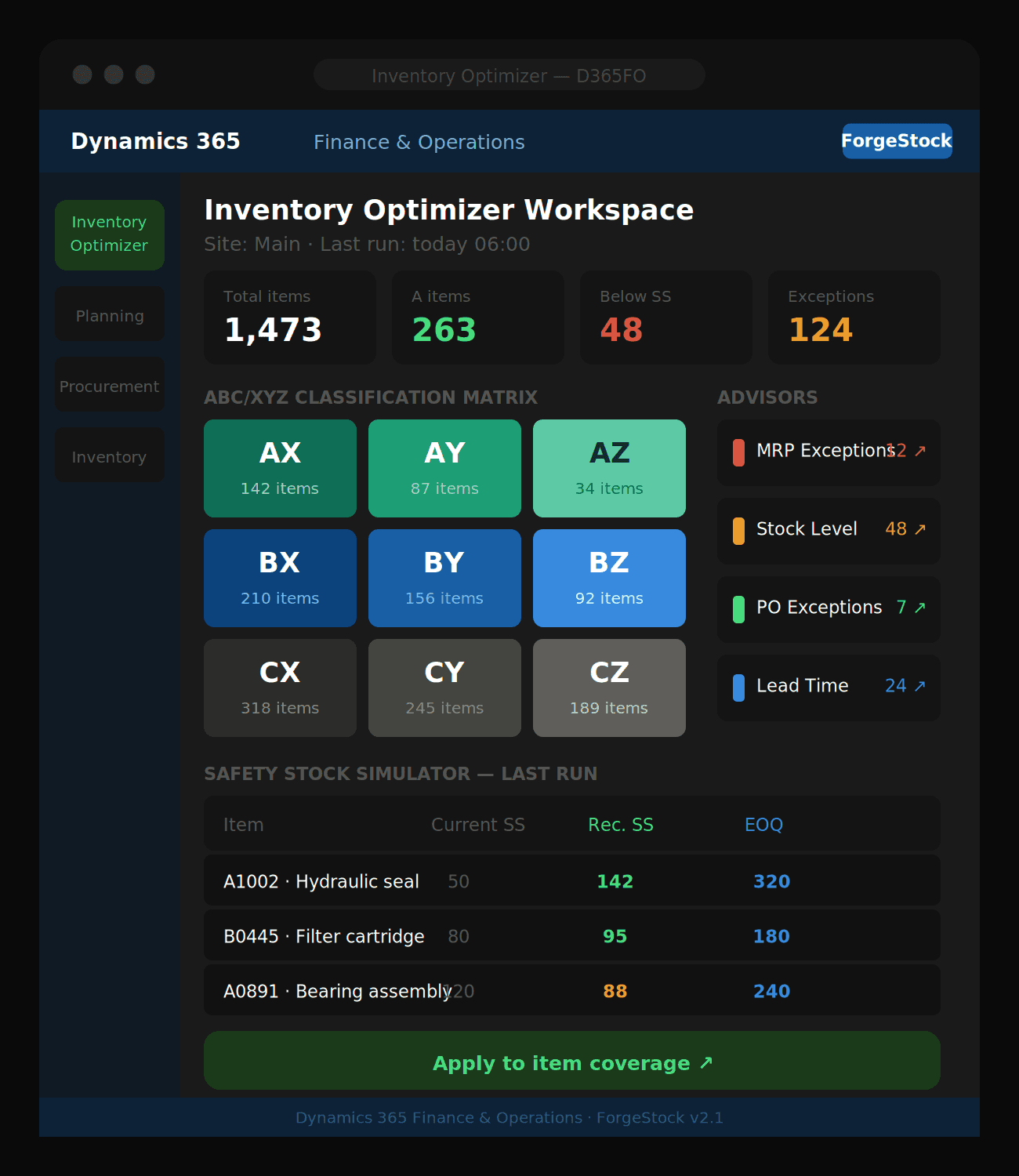
Navigate to Inventory management → Inquiries and reports → Inventory Optimizer, or use the Inventory Optimizer workspace pinned to your dashboard.
04
Does it work with my existing item coverage setup?
Yes. ForgeStock reads your existing coverage groups, item parameters, and planning fences. The Safety Stock and EOQ simulators write recommendations back to item coverage when you apply them.
05
What do I need before running the simulators?
Run the ABC/XYZ Classification batch job first. The Safety Stock, ROP, and Lot Size simulators all depend on demand statistics generated by that job..
06
Can the Copilot Assistant answer questions about my inventory?
Yes. The built-in Copilot Assistant is powered by Azure OpenAI and can answer natural language questions about your stock levels, MRP exceptions, supplier lead times, and ABC/XYZ classifications — without leaving D365FO.
Got questions?
We’ve got answers.
Here’s everything you need to know before getting started.
01
What is ForgeStock built on?
ForgeStock is a native X++ module running inside Dynamics 365 Finance & Operations. No integration, no plugin — it lives where your team already works.
02
Do I need to run batch jobs to use it?
Yes. Most features are powered by scheduled batch jobs (e.g. ABC/XYZ Classification, MRP Exception Advisor). These run on your schedule and keep data fresh automatically.
03
Where do I find ForgeStock in D365FO?
Navigate to Inventory management → Inquiries and reports → Inventory Optimizer, or use the Inventory Optimizer workspace pinned to your dashboard.
04
Does it work with my existing item coverage setup?
Yes. ForgeStock reads your existing coverage groups, item parameters, and planning fences. The Safety Stock and EOQ simulators write recommendations back to item coverage when you apply them.
05
What do I need before running the simulators?
Run the ABC/XYZ Classification batch job first. The Safety Stock, ROP, and Lot Size simulators all depend on demand statistics generated by that job..
06
Can the Copilot Assistant answer questions about my inventory?
Yes. The built-in Copilot Assistant is powered by Azure OpenAI and can answer natural language questions about your stock levels, MRP exceptions, supplier lead times, and ABC/XYZ classifications — without leaving D365FO.
Got questions?
We’ve got answers.
Here’s everything you need to know before getting started.
01
What is ForgeStock built on?
ForgeStock is a native X++ module running inside Dynamics 365 Finance & Operations. No integration, no plugin — it lives where your team already works.
02
Do I need to run batch jobs to use it?
Yes. Most features are powered by scheduled batch jobs (e.g. ABC/XYZ Classification, MRP Exception Advisor). These run on your schedule and keep data fresh automatically.
03
Where do I find ForgeStock in D365FO?
Navigate to Inventory management → Inquiries and reports → Inventory Optimizer, or use the Inventory Optimizer workspace pinned to your dashboard.
04
Does it work with my existing item coverage setup?
Yes. ForgeStock reads your existing coverage groups, item parameters, and planning fences. The Safety Stock and EOQ simulators write recommendations back to item coverage when you apply them.
05
What do I need before running the simulators?
Run the ABC/XYZ Classification batch job first. The Safety Stock, ROP, and Lot Size simulators all depend on demand statistics generated by that job..
06
Can the Copilot Assistant answer questions about my inventory?
Yes. The built-in Copilot Assistant is powered by Azure OpenAI and can answer natural language questions about your stock levels, MRP exceptions, supplier lead times, and ABC/XYZ classifications — without leaving D365FO.
Ready to optimize your inventory?
See how ForgeStock eliminates overstock, prevents stockouts, and brings intelligence to your D365FO — it only takes a conversation to get started.
Ready to optimize your inventory?
See how ForgeStock eliminates overstock, prevents stockouts, and brings intelligence to your D365FO — it only takes a conversation to get started.